Skip to content
NIYAM for infrastructure & civil

Keep every work front attached to its evidence.

Give field and office teams one calm record of the location, work, resources and decision still required.

A project like yours

East Link drainage work fronts

Bhubaneswar · Urban drainage corridor
Demonstration project · Work in progress

Explore East Link drainage work fronts in five scenes
01 / 05

Make the current chainage and next release clear.

Readiness, drain construction and closeout milestones give each field team a simple path without turning the site record into an engineering programme.

Current focus: chainage 2+140 bedding

Explore this workflow
Actual NIYAM site overview for the fictional East Link drainage work fronts, showing the current stage, responsible lead and civil-work milestones.
Actual NIYAM screen · Fictional demo data Open full screenshot (new tab)
02 / 05

Keep location, progress and the open condition together.

The daily photo and task record show completed bedding and the separate dewatering review that still blocks the next work front.

One dewatering review remains open before formwork

Explore this workflow
Desktop view: Actual NIYAM site photo record for the fictional East Link drainage work fronts, showing shared progress evidence and its work-front context. Phone view: Actual NIYAM mobile photo record for the fictional East Link drainage work front.
Actual NIYAM screen · Fictional demo data Open full screenshot (new tab) Open full screenshot (new tab)
03 / 05

Explain the recorded balance through movements.

Aggregate receipts and supported work-front usage stay visible before the physical site balance is confirmed.

48 m³ received − 31 m³ used = 17 m³ recorded

Explore this workflow
Actual NIYAM material ledger for the fictional East Link drainage project, showing aggregate receipts, usage and recorded balance.
Actual NIYAM screen · Fictional demo data Open full screenshot (new tab)
04 / 05

Separate the equipment bill from the client change.

The equipment crew balance and additional dewatering record retain distinct approval, payment and collection histories.

₹42,000 equipment balance · ₹25,000 client amount due

Explore this workflow
Actual NIYAM money view for the fictional East Link drainage project, separating site costs, supplier balance and client amount due.
Actual NIYAM screen · Fictional demo data Open full screenshot (new tab)
05 / 05

Report progress without presenting it as certified measurement.

The reviewed DPR shares the work-front update and open condition while measurement and engineering acceptance remain assigned.

Reviewed work-front record with technical acceptance still assigned

Explore this workflow
Actual NIYAM reviewed DPR for the fictional East Link drainage project, showing work-front evidence and the open review action.
Actual NIYAM screen · Fictional demo data Open full screenshot (new tab)

Prompt ideas require a connected assistant and permitted access. Review proposed changes before saving.

Screens captured from NIYAM on 9 September 2026. Names, amounts and projects are fictional. Site photos inside the demo are AI illustrations.

From site to client

Give each person the right view.

For civil contractors, supervisors and project teams coordinating distributed work fronts and documented reviews.

The field supervisor

Records the correct chainage, crew, progress, aggregate movement and site evidence.

Explore this role

The project and commercial team

Reviews missing context, equipment bills and change records before approval.

Explore this role

The consultant or client

Receives selected reviewed progress while technical acceptance remains with authorised professionals.

Explore this role
The client’s side

A clear view of the work you share.

Selected progress and reports keep your client informed. Supplier bills and internal expenses stay with your team.

How sharing works
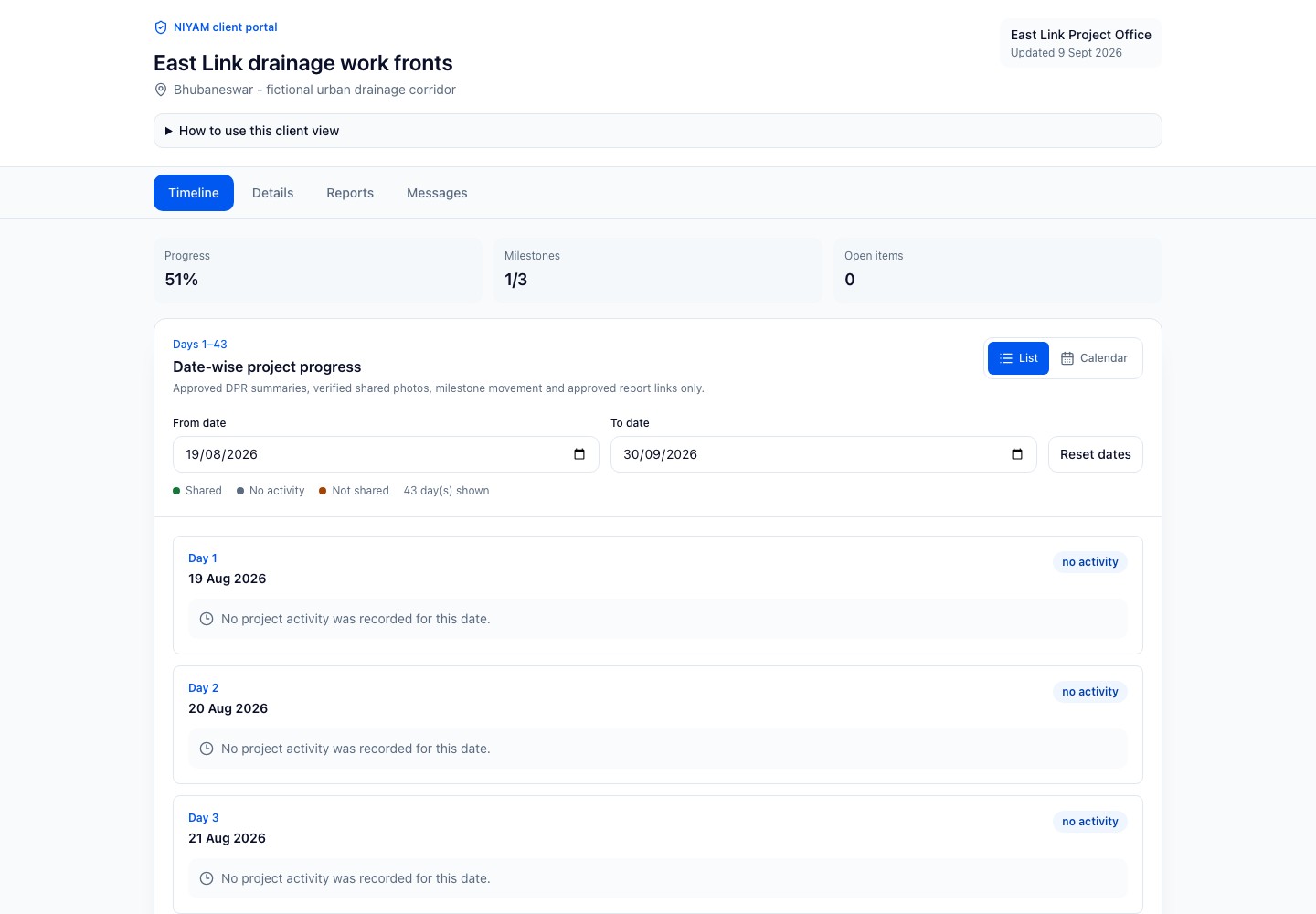
Actual NIYAM client portal for the fictional East Link drainage project, showing only selected reviewed progress and shared evidence.
Actual NIYAM screen · Fictional demo data Open full screenshot (new tab)
The Agentic Stack

Ask for help.
Keep the decision.

Connect assistance to your site context. Check the records, review the proposal and confirm the work you want saved.

ChatGPT · Assisted setup

Start with a question.

Explore connecting ChatGPT to permitted NIYAM workflows through MCP.

ChatGPT connection guide
Codex · Assisted setup

Plan the team’s workflow.

Connect supported NIYAM tools for scoped work. Check the source, review the action and verify its result.

Codex connection guide
NIYAM · Review before saving

Prepare the routine parts.

Configured bill extraction and report drafts support review. General internal-agent actions are not yet qualified.

See bill review

Core site work has a complete manual path. New integrations are agreed by scope.

How MCP connects the tools
Before you start

A clear fit for your team.

NIYAM organises operational records. It does not survey, calculate or certify quantities, perform engineering analysis, approve safety controls or make contractual measurement decisions.

Review access and controls
Can we organise a linear project by work front?

Yes. Use site areas, milestone names and tasks to identify stretches or chainages. East Link keeps chainage 2+140 and 2+180 actions separate while retaining one project review flow.

Does NIYAM calculate measured quantities?

No. NIYAM records the confirmed quantity and supporting evidence supplied by your team. Surveying, BOQ measurement, engineering calculation and certification remain with qualified reviewers and your specialist tools.

How does the office know which work front needs attention?

Each task and DPR retains its site, date, owner and evidence. The current demo keeps the dewatering review visible before the next formwork activity proceeds.

Can material records explain the site balance?

Receipts and supported usage remain separate movements. East Link records 48 cubic metres received and 31 used, leaving 17 for physical verification.

Will the client see internal equipment costs?

No. Client access contains selected shared progress. Internal bills, reimbursements and commercial details stay within authorised team views unless someone explicitly prepares an appropriate external record.

Can an assistant compare work-front records?

A connected assistant can prepare source-linked findings where supported. The responsible project professional reviews context, quantities and any proposed action before it is saved or shared.

Start where you are

One site is a good beginning.

Add the current plan, bring in your team and record the next day’s work. For an existing project, agree opening stock and balances before you carry them forward.

Plan your first site
Start free trialReview plans and limits firstChoose your plan before the trial begins.