Skip to content
NIYAM for distributed installations

Give every client location the same clear delivery rhythm.

Coordinate repeatable visits across customer premises while keeping each location’s work, costs, evidence and closure status distinct.

A project like yours

Metro Retail installation visits

Bengaluru · Retail client premises
Demonstration project · Work in progress

Explore Metro Retail installation visits in five scenes
01 / 05

Keep every client location and visit owner distinct.

Confirmation, installation and closure milestones give mobile teams a repeatable structure while preserving each premises record.

Current focus: Koramangala entrance installation

Explore this workflow
Actual NIYAM site overview for the fictional Metro Retail installation visits, showing the active premises stage, responsible lead and repeatable milestones.
Actual NIYAM screen · Fictional demo data Open full screenshot (new tab)
02 / 05

Attach field evidence to the correct premises.

The Koramangala installation is recorded while the Indiranagar alignment follow-up remains open under its own location context.

One client location still needs closure evidence

Explore this workflow
Desktop view: Actual NIYAM site photo record for the fictional Metro Retail installation visits, showing access-control work attached to its client premises. Phone view: Actual NIYAM mobile photo record for a fictional Metro Retail client-premises installation.
Actual NIYAM screen · Fictional demo data Open full screenshot (new tab) Open full screenshot (new tab)
03 / 05

Connect hardware movements to the installation work.

Receipts and supported usage explain the recorded balance before another location receives equipment.

38 door kits received − 26 used = 12 recorded

Explore this workflow
Actual NIYAM material ledger for the fictional Metro Retail installations, showing door-kit receipts, usage and recorded balance.
Actual NIYAM screen · Fictional demo data Open full screenshot (new tab)
04 / 05

Keep field cost, supplier exposure and client money separate.

Travel, the field-crew bill and the requested second-door installation retain their own review and collection histories.

₹65,000 installer balance · ₹22,000 client amount due

Explore this workflow
Actual NIYAM money view for the fictional Metro Retail installations, separating visit cost, supplier balance and client amount due.
Actual NIYAM screen · Fictional demo data Open full screenshot (new tab)
05 / 05

Give the client its reviewed update and the open action.

The DPR keeps location evidence and the outstanding alignment follow-up clear without presenting the installation as tested or accepted.

Client-specific update with acceptance still assigned

Explore this workflow
Actual NIYAM reviewed DPR for the fictional Metro Retail installations, showing premises evidence and the closure follow-up still assigned.
Actual NIYAM screen · Fictional demo data Open full screenshot (new tab)

Prompt ideas require a connected assistant and permitted access. Review proposed changes before saving.

Screens captured from NIYAM on 9 September 2026. Names, amounts and projects are fictional. Site photos inside the demo are AI illustrations.

From site to client

Give each person the right view.

For access-control, CCTV, signage and other installation businesses coordinating mobile teams across repeated customer-premises jobs.

The mobile installer

Records the visit, hardware movement and evidence against the correct client location.

Explore this role

The operations coordinator

Reviews unfinished visits, missing evidence, field costs and responsible follow-up across locations.

Explore this role

The client facilities team

Receives selected reviewed information for its assigned work while internal costs remain private.

Explore this role
The client’s side

A clear view of the work you share.

Selected progress and reports keep your client informed. Supplier bills and internal expenses stay with your team.

How sharing works
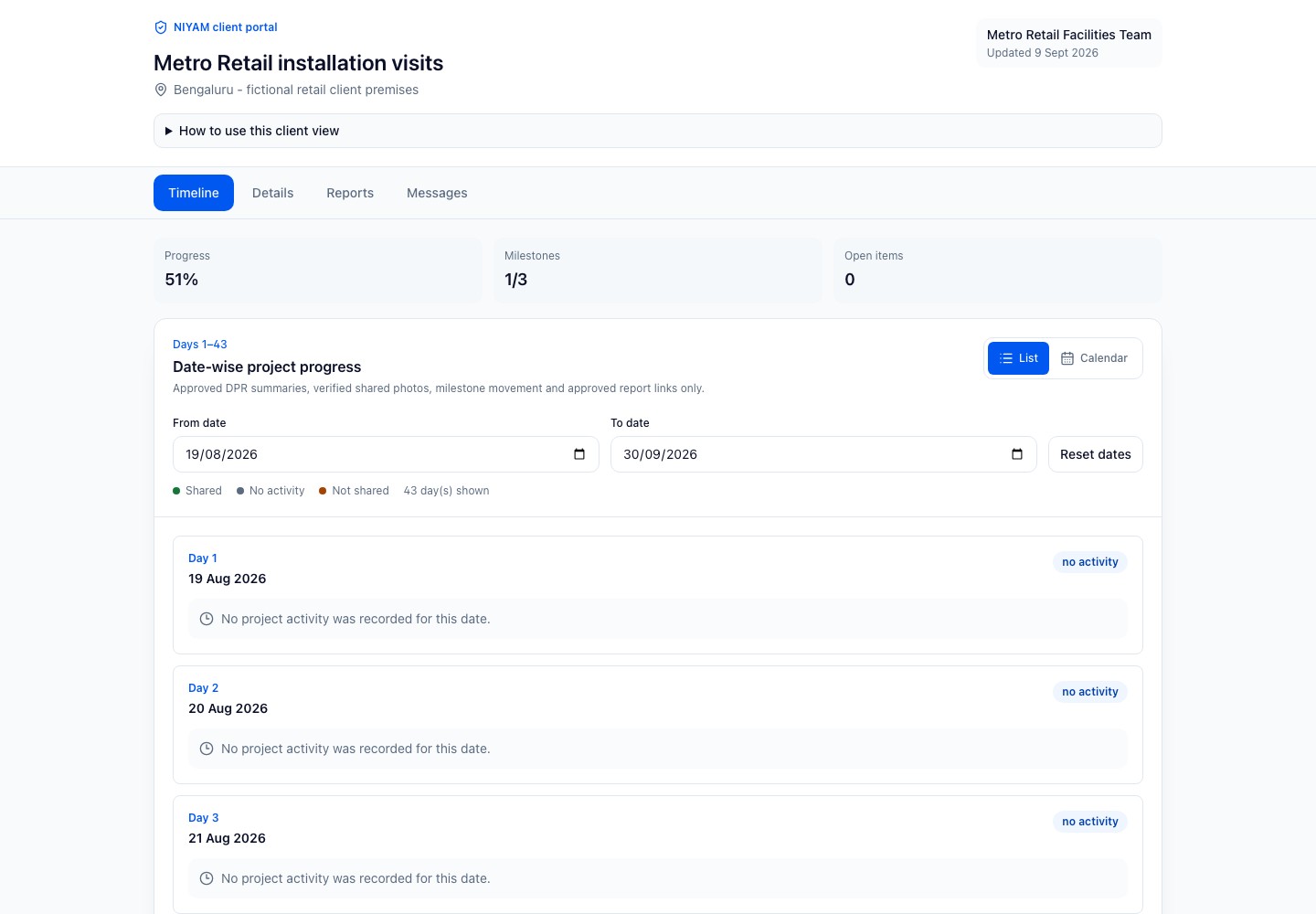
Actual NIYAM client portal for the fictional Metro Retail installations, showing only selected reviewed progress and shared evidence.
Actual NIYAM screen · Fictional demo data Open full screenshot (new tab)
The Agentic Stack

Ask for help.
Keep the decision.

Connect assistance to your site context. Check the records, review the proposal and confirm the work you want saved.

ChatGPT · Assisted setup

Start with a question.

Explore connecting ChatGPT to permitted NIYAM workflows through MCP.

ChatGPT connection guide
Codex · Assisted setup

Plan the team’s workflow.

Connect supported NIYAM tools for scoped work. Check the source, review the action and verify its result.

Codex connection guide
NIYAM · Review before saving

Prepare the routine parts.

Configured bill extraction and report drafts support review. General internal-agent actions are not yet qualified.

See bill review

Core site work has a complete manual path. New integrations are agreed by scope.

How MCP connects the tools
Before you start

A clear fit for your team.

NIYAM coordinates installation records. It does not monitor devices or surveillance feeds, operate access systems, optimise technician routes, verify security performance or certify testing and client acceptance.

Review access and controls
Can repeat installations follow one operating pattern?

Yes. Create each client location with consistent milestone and task naming, then assign its responsible crew. The Metro Retail example keeps Koramangala and Indiranagar evidence and open work identifiable.

Will records from different client locations be mixed?

Site assignment, permissions and location-specific records keep the operational context separate. Review access before inviting a client or sharing a report.

Does NIYAM monitor CCTV or access-control devices?

No. NIYAM records installation work and review evidence. It does not receive surveillance feeds, operate access systems or show live device health without a separately verified integration.

How are installation kits reconciled?

Metro Retail records 38 door kits received and 26 used, leaving 12 recorded for physical verification. The team remains responsible for actual count, condition and suitability.

Can the client see technician expenses or our supplier bills?

No. Client access contains selected shared site information. Travel expenses, supplier bills, reimbursements and internal commercial records remain in authorised team views.

What prevents a location from being closed too early?

Open tasks, missing evidence and responsible review remain visible. The Indiranagar location keeps its door-alignment follow-up open until authorised people review the supporting record and decide on acceptance.

Start where you are

One site is a good beginning.

Add the current plan, bring in your team and record the next day’s work. For an existing project, agree opening stock and balances before you carry them forward.

Plan your first site
Start free trialReview plans and limits firstChoose your plan before the trial begins.